> ## Documentation Index
> Fetch the complete documentation index at: https://docs.bestchatbot.io/llms.txt
> Use this file to discover all available pages before exploring further.
# Agentic Actions
> Let your chatbot take real actions like booking meetings, opening support tickets, and looking up orders, not just answer questions.
# Agentic Actions
Most chatbots can only *tell* visitors things. BestChatBot can also *do* things.
With **Agentic Actions**, your widget connects to the tools your business already uses, like your calendar, your help desk, your store, and your billing, and performs real actions on the visitor's behalf, right inside the chat.
Agentic Actions are available on the **Pro** and **Business** plans. See [Available Integrations](/integrations/available-integrations) for the full list of supported tools.
## From Answering to Acting
A regular bot answers from your knowledge base. An agentic bot does that **and** can take the next step for the visitor:
| Visitor asks | A regular bot | BestChatBot with Agentic Actions |
| --------------------------------- | --------------------------- | ----------------------------------------------- |
| "Can I book a call for Thursday?" | Explains how to book | Shows available times and **books the meeting** |
| "Where's my order #1234?" | Points to a tracking page | **Looks up the order** and reports its status |
| "I need help, this isn't working" | Suggests contacting support | **Opens a support ticket** for the visitor |
## How It Works
They type naturally, like "I'd like to schedule a demo" or "Check my subscription."
It decides whether the visitor wants an **action**, an **answer** from your knowledge base, or just to chat, then picks the right tool for the job.
Instead of guessing, the bot presents the matching action (for example, **Book a Call**) and, when needed, a short form to fill in.
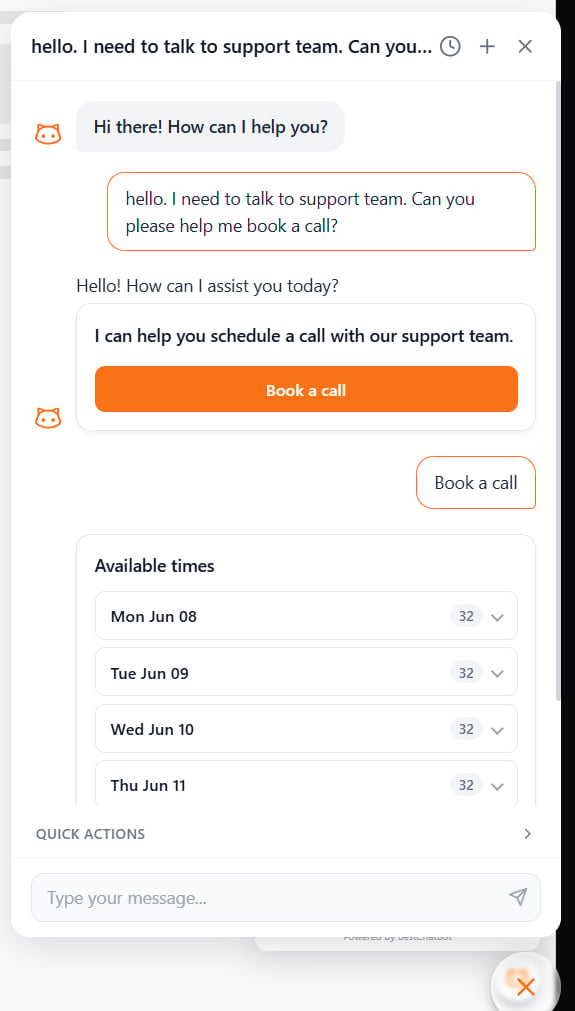 The action runs **only** when the visitor clicks the button or submits the form, never from a loose phrase.
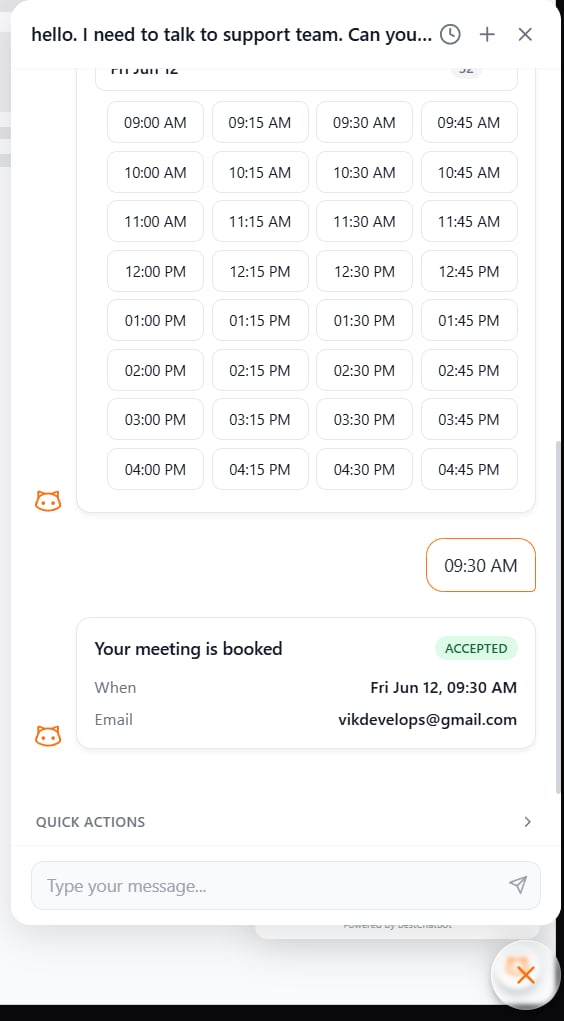
The meeting is booked, the ticket is created, the order status appears, all right in the conversation.
The action runs **only** when the visitor clicks the button or submits the form, never from a loose phrase.
The meeting is booked, the ticket is created, the order status appears, all right in the conversation.
 ## The Visitor Is Always in Control
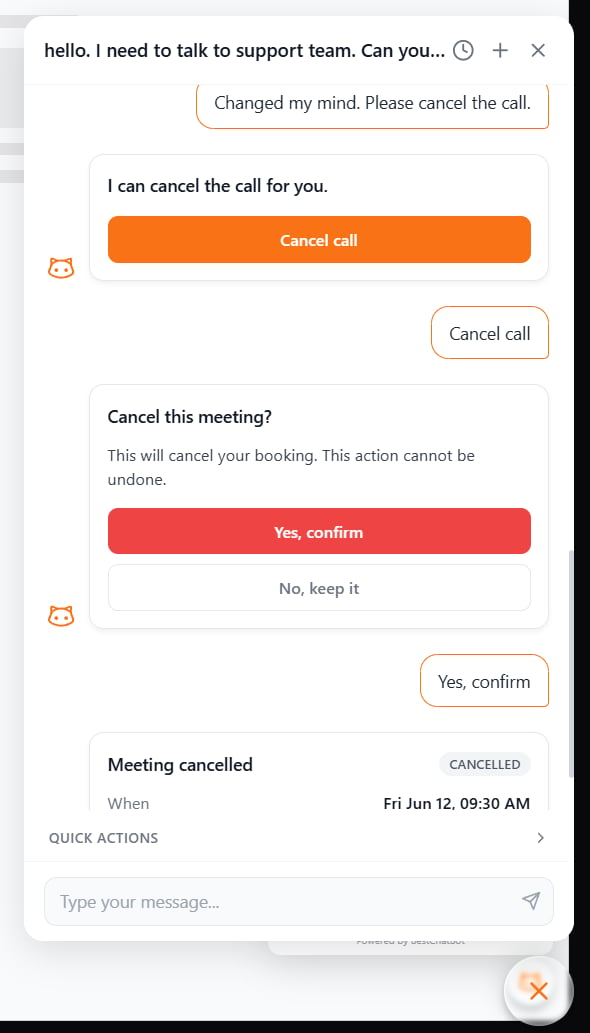
Actions never fire just because the bot *interpreted* a sentence. They run when the visitor **explicitly clicks** the action button. This prevents surprises and keeps every action intentional.
Think of the bot as a helpful assistant that says "I can do that for you, just confirm" instead of acting on its own.
## The Visitor Is Always in Control
Actions never fire just because the bot *interpreted* a sentence. They run when the visitor **explicitly clicks** the action button. This prevents surprises and keeps every action intentional.
Think of the bot as a helpful assistant that says "I can do that for you, just confirm" instead of acting on its own.
 ## Identity-Aware Actions
Some actions are personal, like looking up *your* orders, *your* invoices, *your* subscription. The bot only runs these when it can confirm who the visitor is.
* **Identified visitor** → personal actions run normally (e.g., "show my recent orders").
* **Anonymous visitor** → the bot gives a safe, neutral response instead of guessing or exposing anyone's data.
This keeps private information protected while still letting anonymous visitors use general actions like browsing products or booking a call.
## Actions and Your Quota
An agentic action only counts toward your [response quota](/billing/usage-tracking) when it **actually runs**:
* ✅ **Executed successfully** (the meeting is booked, the order is found) — counts as one response.
* ➖ **Offered but not used** (the bot shows a button the visitor never clicks) — free.
* ➖ **Failed or unavailable** (the tool errors, or an anonymous visitor is asked to identify first) — free.
In short, you're billed only when the bot delivers a real result.
## Availability
| Plan | Agentic Actions |
| -------- | --------------- |
| Free | — |
| Starter | — |
| Pro | ✅ |
| Business | ✅ |
## Next Steps
See the 8 tools you can connect and what each one can do.
Compare plans and find the one that turns on Agentic Actions.
## Identity-Aware Actions
Some actions are personal, like looking up *your* orders, *your* invoices, *your* subscription. The bot only runs these when it can confirm who the visitor is.
* **Identified visitor** → personal actions run normally (e.g., "show my recent orders").
* **Anonymous visitor** → the bot gives a safe, neutral response instead of guessing or exposing anyone's data.
This keeps private information protected while still letting anonymous visitors use general actions like browsing products or booking a call.
## Actions and Your Quota
An agentic action only counts toward your [response quota](/billing/usage-tracking) when it **actually runs**:
* ✅ **Executed successfully** (the meeting is booked, the order is found) — counts as one response.
* ➖ **Offered but not used** (the bot shows a button the visitor never clicks) — free.
* ➖ **Failed or unavailable** (the tool errors, or an anonymous visitor is asked to identify first) — free.
In short, you're billed only when the bot delivers a real result.
## Availability
| Plan | Agentic Actions |
| -------- | --------------- |
| Free | — |
| Starter | — |
| Pro | ✅ |
| Business | ✅ |
## Next Steps
See the 8 tools you can connect and what each one can do.
Compare plans and find the one that turns on Agentic Actions.