> ## Documentation Index
> Fetch the complete documentation index at: https://docs.bestchatbot.io/llms.txt
> Use this file to discover all available pages before exploring further.
# Usage Tracking
> Monitor your monthly response usage and stay within your plan limits.
# Usage Tracking
BestChatBot tracks your **monthly widget responses** so you always know how much of your plan you've used. Usage resets at the beginning of each billing cycle.
## Viewing Your Usage
In the dashboard, you'll find usage information in several places:
### Usage Indicator
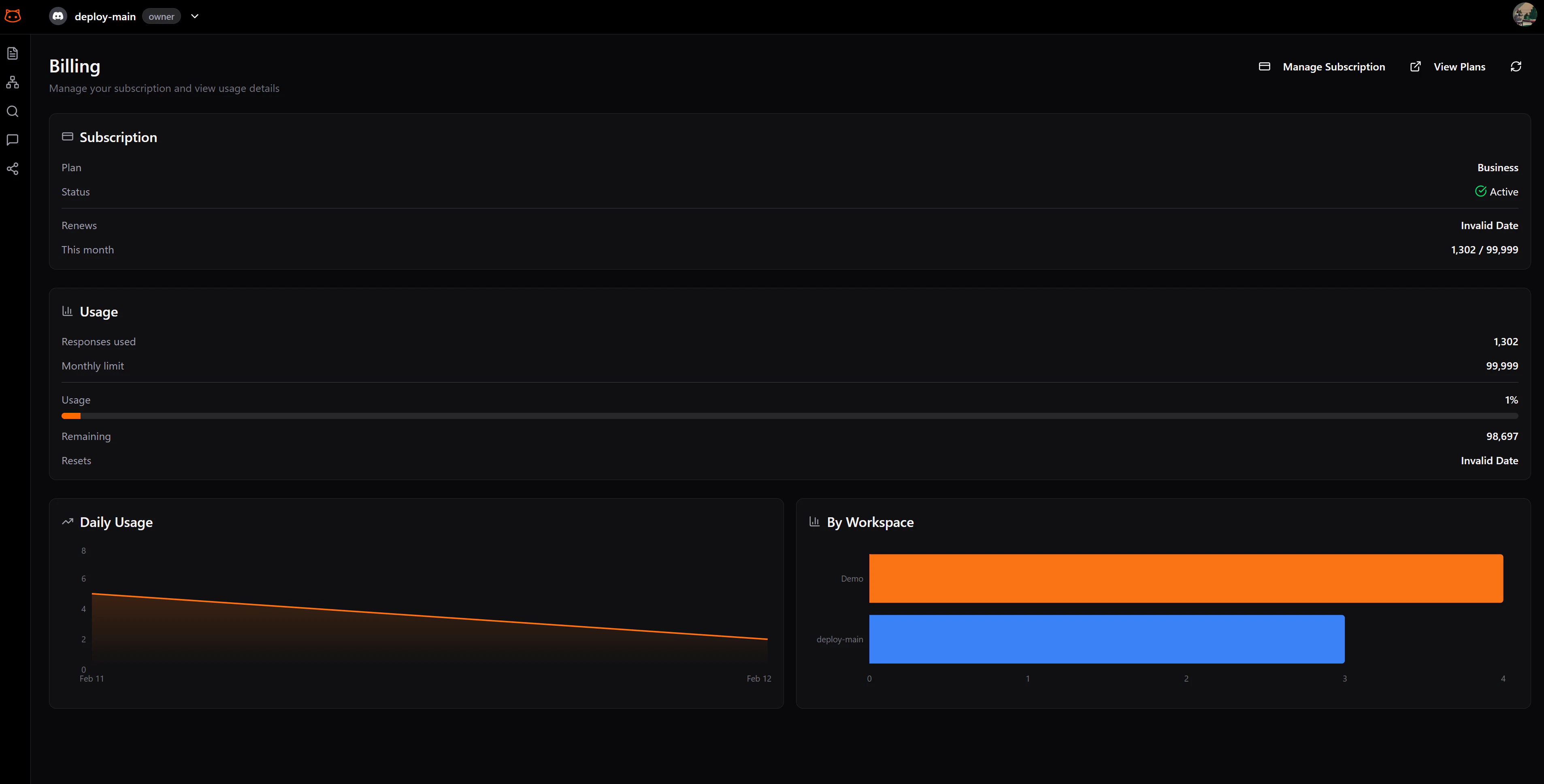
A quick-glance indicator in the sidebar or top bar shows your current usage as a percentage of your plan limit.
### Usage Chart
The **Billing** section includes a chart showing your response usage over time, so you can see trends and predict when you might approach your limit.
### Workspace Distribution
If you have multiple workspaces (multiple widgets), you can see how usage is distributed across them. This helps you identify which sites are most active.
 ## What Counts as a Response
A **bot response** is any answer the bot actually generates and returns — on your live widget **or** in the Retrieval Testing page. A successfully executed agentic action also counts. If the bot doesn't deliver a result, you aren't charged.
| Action | Counts as Response? |
| -------------------------------------------------------- | ------------------- |
| Widget answers a visitor message | Yes |
| Retrieval Testing produces an answer | Yes |
| Agentic action runs successfully (e.g., books a meeting) | Yes |
| Agentic action only offered, not run by the visitor | No |
| Agentic action fails or is unavailable | No |
| Bot can't answer (no response generated) | No |
| Rebuilding the knowledge base | No |
| Uploading documents | No |
You're billed only when the bot produces a real result. Offering an action, failing, or not finding an answer is free.
## Approaching Your Limit
When you're nearing your monthly limit:
* The usage indicator changes color to warn you
* You can upgrade your plan at any time to get more responses
Once you hit your monthly limit, the widget will stop responding to visitors until the next billing cycle or until you upgrade.
## Usage by Plan
| Plan | Widget Responses/mo |
| -------- | ------------------- |
| Free | 75 |
| Starter | 800 |
| Pro | 2,000 |
| Business | 5,000 |
## Next Steps
Need more responses? Upgrade anytime.
Compare all available plans.
## What Counts as a Response
A **bot response** is any answer the bot actually generates and returns — on your live widget **or** in the Retrieval Testing page. A successfully executed agentic action also counts. If the bot doesn't deliver a result, you aren't charged.
| Action | Counts as Response? |
| -------------------------------------------------------- | ------------------- |
| Widget answers a visitor message | Yes |
| Retrieval Testing produces an answer | Yes |
| Agentic action runs successfully (e.g., books a meeting) | Yes |
| Agentic action only offered, not run by the visitor | No |
| Agentic action fails or is unavailable | No |
| Bot can't answer (no response generated) | No |
| Rebuilding the knowledge base | No |
| Uploading documents | No |
You're billed only when the bot produces a real result. Offering an action, failing, or not finding an answer is free.
## Approaching Your Limit
When you're nearing your monthly limit:
* The usage indicator changes color to warn you
* You can upgrade your plan at any time to get more responses
Once you hit your monthly limit, the widget will stop responding to visitors until the next billing cycle or until you upgrade.
## Usage by Plan
| Plan | Widget Responses/mo |
| -------- | ------------------- |
| Free | 75 |
| Starter | 800 |
| Pro | 2,000 |
| Business | 5,000 |
## Next Steps
Need more responses? Upgrade anytime.
Compare all available plans.