> ## Documentation Index
> Fetch the complete documentation index at: https://docs.bestchatbot.io/llms.txt
> Use this file to discover all available pages before exploring further.
# Referral Program
> Share BestChatBot with others and earn recurring commission every time someone you referred pays.
# Referral Program
Know someone who'd get value from BestChatBot? Share your referral link. When they sign up through it and start paying, you earn a **recurring commission** on every payment they make, for as long as they stay subscribed.
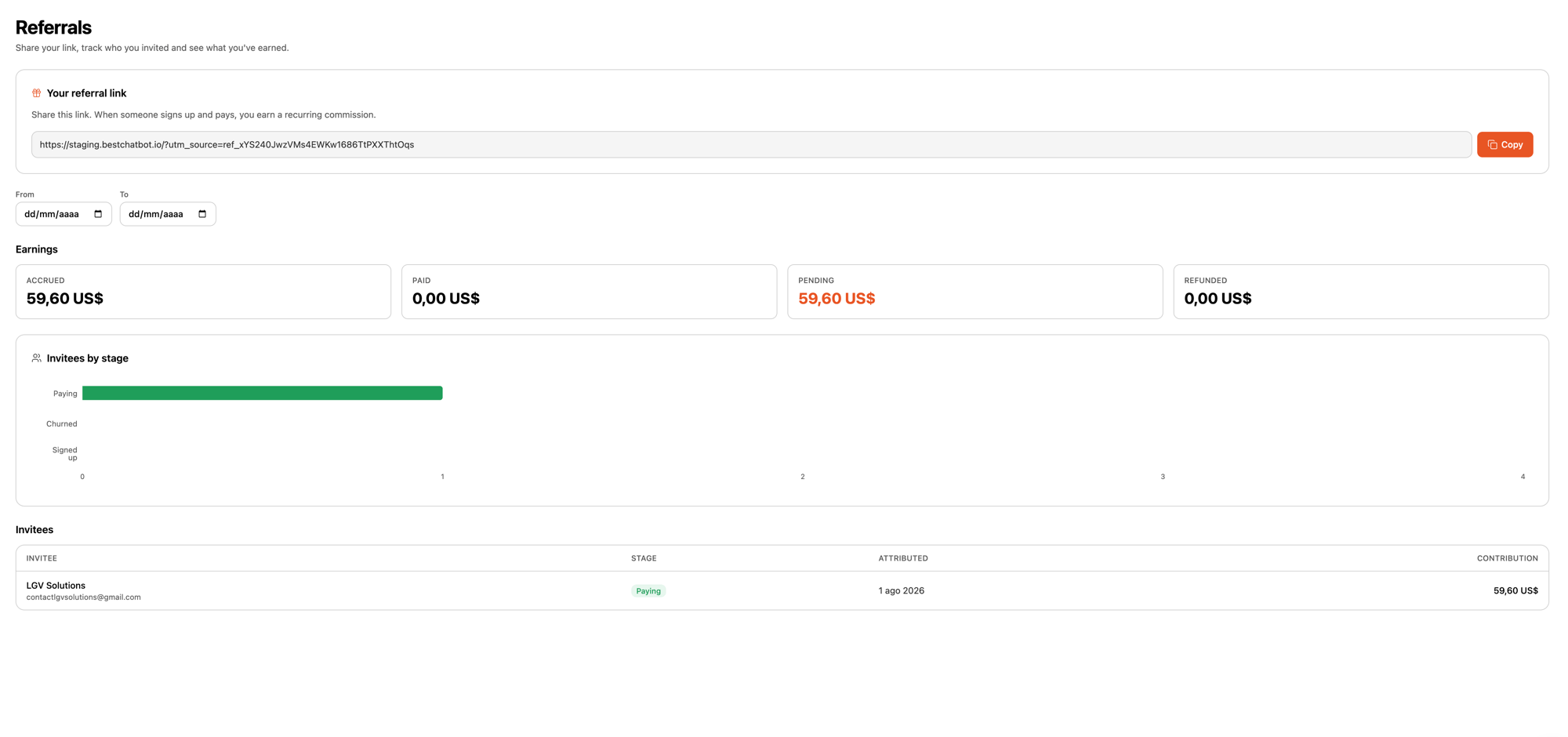
The referral dashboard is **read-only**. It shows your link, who you've invited, and what you've earned. There's nothing to configure. Find it under the **Referrals** tab in your dashboard.
 ## How You Earn
* **40% recurring commission.** Every time someone you referred pays their subscription, 40% of that payment is credited to you as earnings. It repeats each billing cycle they stay subscribed, not just the first one.
* **Monthly close.** Earnings accrue as they happen and are grouped into monthly periods. At the end of each month, that period closes and its total is finalized.
* **Manual payout.** Payouts are handled manually by our team. Your dashboard tracks what you've accrued and its status, and we settle up with you directly.
Referral commission applies to subscription payments processed through **Stripe**.
## Your Invite Link
Your dashboard gives you a unique referral link to share. Anyone who lands on BestChatBot through it is attributed to you.
* **First touch wins.** The first referral link a new visitor arrives through is the one that counts. If they later click someone else's link, the original attribution stays.
* **It lasts 30 days.** The link is remembered in the visitor's browser for 30 days. If they sign up within that window, the referral is credited to you, even if they don't subscribe right away.
* **Copy and share it anywhere.** Use the **Copy** button next to your link and drop it in a message, a post, or an email.
## Tracking Your Referrals
The **Referrals** tab shows everything about your referrals in one place. It's read-only, so it's just there to keep you informed.
* **Your referral link**, ready to copy.
* **Earnings**, broken down by status: **Accrued** (credited to you), **Paid** (already settled), **Pending** (in an open period), and **Refunded** (a payment was refunded or the charge reversed). Amounts are grouped by currency.
* **Invitees by stage**, a funnel showing how many people are at each step: **Signed up**, **Paying**, and **Churned**.
* **Invitees**, a table listing each person you referred with their stage, when they were attributed, and their contribution to your earnings. People who haven't shared their details show as **Anonymous**.
Use the date filter above the earnings to focus on a specific period, then clear it to see everything again.
## Next Steps
See the plans your referrals can choose from.
Upgrade, downgrade, or manage your own plan.
## How You Earn
* **40% recurring commission.** Every time someone you referred pays their subscription, 40% of that payment is credited to you as earnings. It repeats each billing cycle they stay subscribed, not just the first one.
* **Monthly close.** Earnings accrue as they happen and are grouped into monthly periods. At the end of each month, that period closes and its total is finalized.
* **Manual payout.** Payouts are handled manually by our team. Your dashboard tracks what you've accrued and its status, and we settle up with you directly.
Referral commission applies to subscription payments processed through **Stripe**.
## Your Invite Link
Your dashboard gives you a unique referral link to share. Anyone who lands on BestChatBot through it is attributed to you.
* **First touch wins.** The first referral link a new visitor arrives through is the one that counts. If they later click someone else's link, the original attribution stays.
* **It lasts 30 days.** The link is remembered in the visitor's browser for 30 days. If they sign up within that window, the referral is credited to you, even if they don't subscribe right away.
* **Copy and share it anywhere.** Use the **Copy** button next to your link and drop it in a message, a post, or an email.
## Tracking Your Referrals
The **Referrals** tab shows everything about your referrals in one place. It's read-only, so it's just there to keep you informed.
* **Your referral link**, ready to copy.
* **Earnings**, broken down by status: **Accrued** (credited to you), **Paid** (already settled), **Pending** (in an open period), and **Refunded** (a payment was refunded or the charge reversed). Amounts are grouped by currency.
* **Invitees by stage**, a funnel showing how many people are at each step: **Signed up**, **Paying**, and **Churned**.
* **Invitees**, a table listing each person you referred with their stage, when they were attributed, and their contribution to your earnings. People who haven't shared their details show as **Anonymous**.
Use the date filter above the earnings to focus on a specific period, then clear it to see everything again.
## Next Steps
See the plans your referrals can choose from.
Upgrade, downgrade, or manage your own plan.